> ## Documentation Index
> Fetch the complete documentation index at: https://docs.flowpayroll.ai/llms.txt
> Use this file to discover all available pages before exploring further.
# Pay elements
> What pay elements are, how their tax, NI, and pension treatment drives every payslip line, and how to create or import your own.
A pay element is the building block of every payslip line in Flow Payroll. Whenever an employee is paid or deducted anything — basic pay, overtime, a bonus, a season-ticket loan repayment — the line references a pay element, and the pay element decides how that money is treated: whether it's taxed, whether it attracts National Insurance, whether it counts towards pension contributions, holiday accrual, or National Minimum Wage checks, and whether a court order can attach to it.
That's the point of defining them once: you set the treatment on the element, and every line that uses it — typed into a pay run, imported from CSV, or created by a recurring payment — calculates correctly without anyone re-deciding the rules each time.
## What a pay element defines
Every element has a **code** (a short unique identifier like `OVERTIME` — this is what CSV imports and the API reference it by) and a **description** (what employees see on their payslips). The rest falls into three groups:
### Treatment
| Setting | What it controls |
| - | - |
| **Pay Type** | `Payable` adds to pay, `Deductible` subtracts from it, `Informational` shows on the payslip without affecting pay |
| **Tax Type** | `Taxable` or `NonTaxable` — whether the amount counts towards PAYE |
| **NI Type** | `Niable`, `NonNiable`, or `EmployerOnly` — whether the amount attracts employee and/or employer NI |
| **Pensionable** | Whether the amount counts towards pension contributions |
| **Class 1A NI Liable** | Whether the amount is subject to employer Class 1A NI |
| **Accrue Holiday** | Whether hours on this element count towards percentage-of-time [holiday accrual](/guides/holiday/holiday-and-leave) |
| **Subject to NMW check** | Whether the amount is included when Flow checks pay against National Minimum Wage |
### Defaults
Optional values that pre-fill a line when someone picks the element in a pay run: **Default Unit** (Hour, Day, Week, Month, Year, Fixed, Informational, or Percentage), **Default Pay Rate**, **Default Unit Value**, and **Default Charge Rate** (used when on-charging clients).
### Court order eligibility
Seven flags control whether deductions for each court order type can attach to earnings from this element: CMS DEO (Child Maintenance Service), DEA (Direct Earnings Attachment), AEO Priority and AEO Non-Priority (Attachment of Earnings), CTAEO (Council Tax), EA (Earnings Attachment), and MCAEO (Maintenance Calculation). All default to eligible. See [court orders](/guides/compliance/court-orders) for how attachable earnings are calculated.
## Managing pay elements
Go to **Settings** → **Pay elements**.
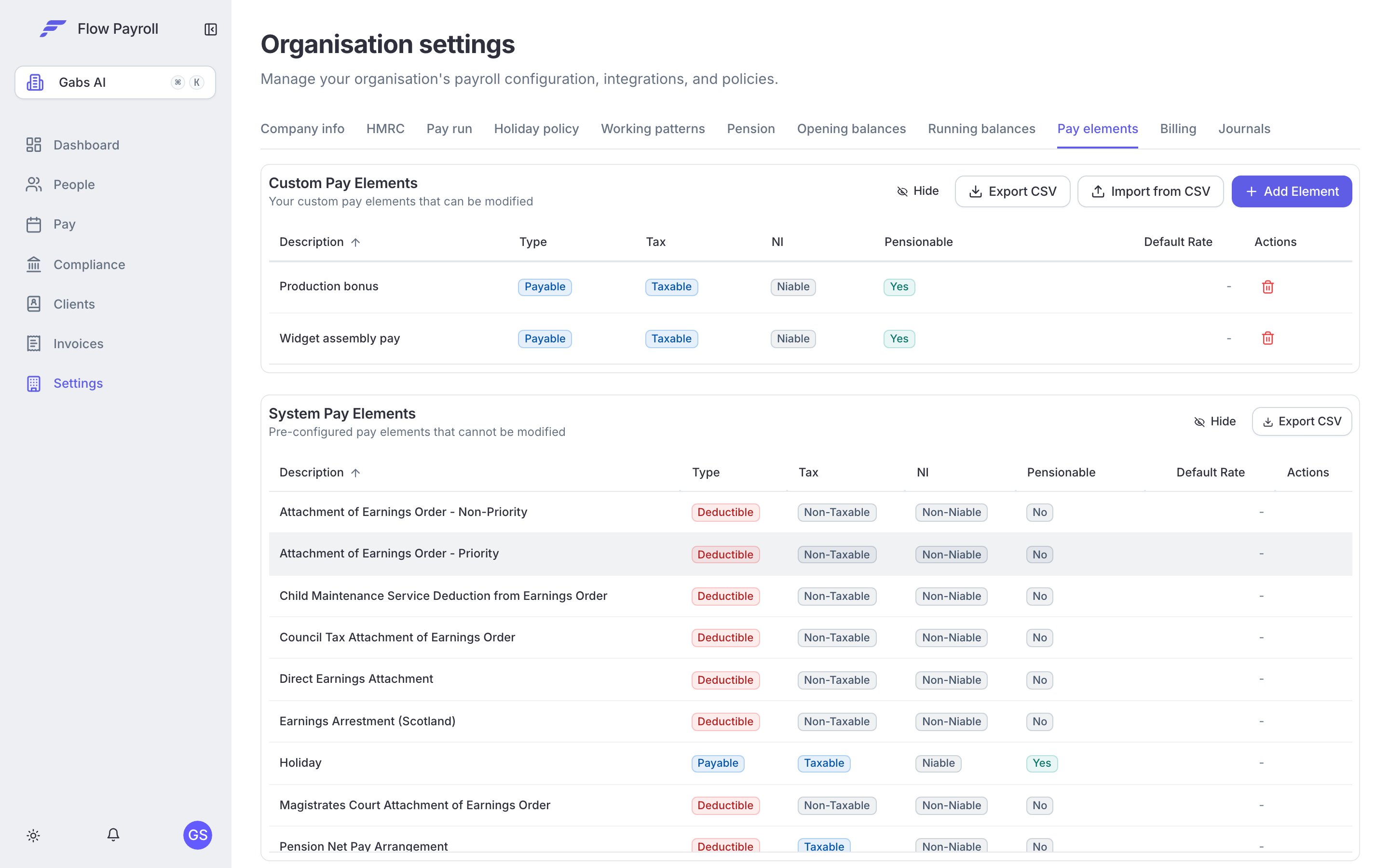
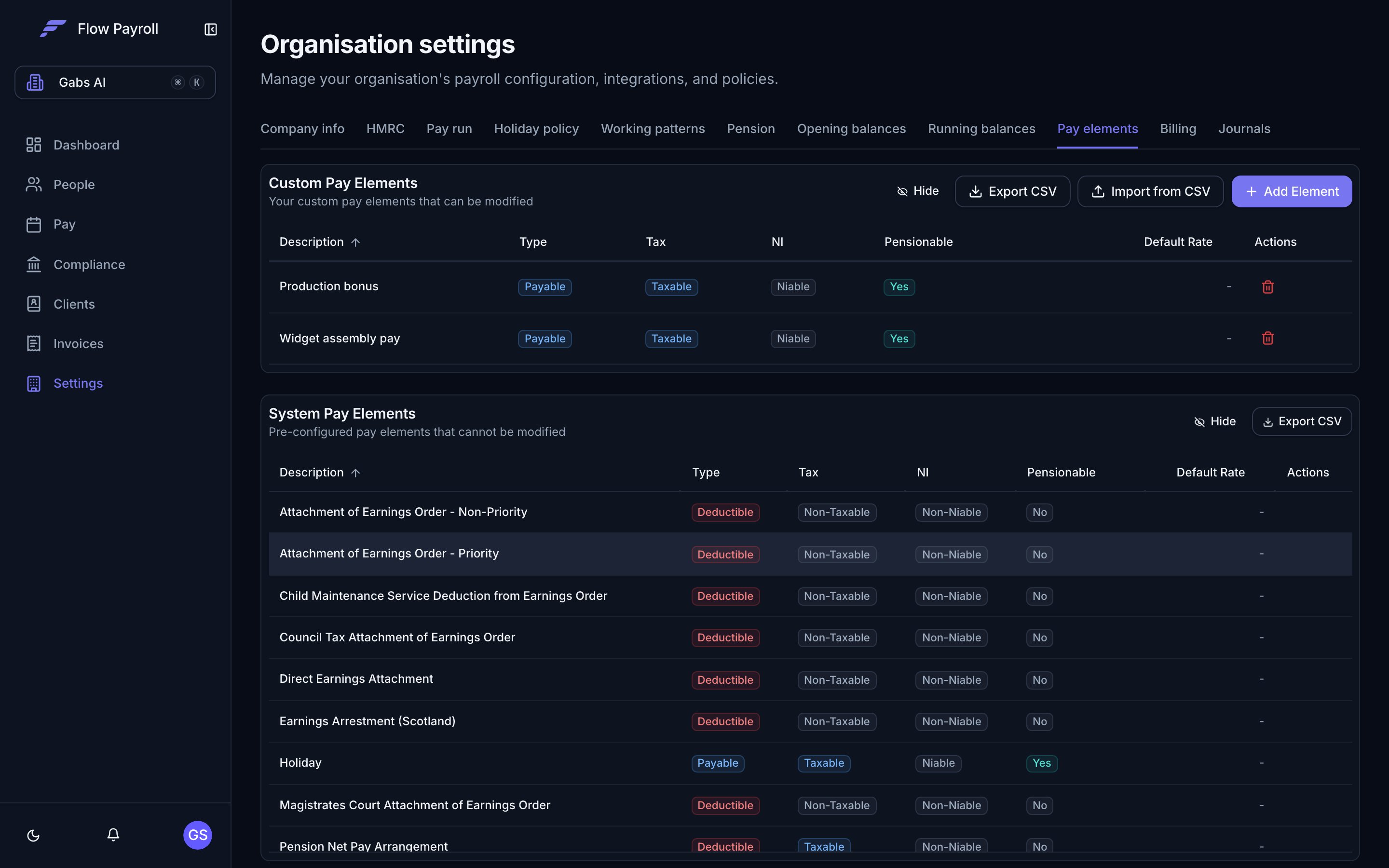 The page has two sections:
* **System Pay Elements** — pre-configured elements that ship with Flow Payroll and cannot be modified. These cover the standard cases, so most organisations only add elements on top.
* **Custom Pay Elements** — your organisation's own elements. Click **Add Element** to create one, or the pencil and bin icons to edit or delete. **Export CSV** downloads your custom elements — useful as a backup, or for importing into another organisation.
## Importing pay elements from CSV
If your pay elements already exist in another system — or in another Flow organisation, via **Export CSV** — import them in bulk with **Import from CSV**. The importer runs on Flow Payroll's shared import wizard: upload a CSV or Excel file, map the columns once, and save the mapping for next time. See [importing data from CSV](/guides/setup/csv-imports) for how the wizard works.
### Mandatory columns
| Column | Notes |
| - | - |
| Code | Unique identifier for the pay element (e.g. OVERTIME, BONUS) |
| Description | Human-readable description shown on payslips |
| Pay Type | `Payable`, `Deductible`, or `Informational` |
| Tax Type | `Taxable` or `NonTaxable` |
| NI Type | `Niable`, `NonNiable`, or `EmployerOnly` |
### Optional columns
| Column | Notes |
| - | - |
| Pensionable | Whether the pay element is pensionable. Defaults to No |
| Class 1A NI Liable | Whether the pay element is subject to Class 1A NI. Defaults to No |
| Accrue Holiday | Whether the pay element accrues holiday. Defaults to No |
| Subject to NMW Check | Whether the pay element is included in NMW checks. Defaults to No |
| Default Unit | Hour, Day, Week, Month, Year, Fixed, Informational, or Percentage |
| Default Pay Rate | Default pay rate (numeric) |
| Default Unit Value | Default unit value (e.g. number of hours). Defaults to 1 |
| Default Charge Rate | Default charge rate (numeric) |
| CMS DEO Eligible | Eligible for Child Maintenance Service DEO. Defaults to Yes |
| DEA Eligible | Eligible for Direct Earnings Attachment. Defaults to Yes |
| AEO Priority Eligible | Eligible for AEO Priority. Defaults to Yes |
| AEO Non-Priority Eligible | Eligible for AEO Non-Priority. Defaults to Yes |
| CTAEO Eligible | Eligible for Council Tax AEO. Defaults to Yes |
| EA Eligible | Eligible for Earnings Attachment. Defaults to Yes |
| MCAEO Eligible | Eligible for Maintenance Calculation AEO. Defaults to Yes |
Yes/No columns accept Yes/No, True/False, or 1/0.
**Template** (`pay_element_import_template.csv` — identical to the wizard's **Download template**):
```csv theme={null}
Code,Description,Pay Type,Tax Type,NI Type,Pensionable,Class 1A NI Liable,Accrue Holiday,Subject to NMW Check,Default Unit,Default Pay Rate,Default Unit Value,Default Charge Rate,CMS DEO Eligible,DEA Eligible,AEO Priority Eligible,AEO Non-Priority Eligible,CTAEO Eligible,EA Eligible,MCAEO Eligible
OVERTIME,Overtime,Payable,Taxable,Niable,No,No,No,No,Hour,15.50,1,20.00,Yes,Yes,Yes,Yes,Yes,Yes,Yes
```
Download pay\_element\_import\_template.csv
## Where pay elements show up
Every payment or deduction line — added by hand or imported from CSV — references a pay element by its code.
Journal templates map each pay element to a nominal code in your chart of accounts.
Percentage-of-time accrual counts hours from elements with holiday accrual switched on.
Billing maps pay elements to account codes when payroll syncs to invoices.
This documentation is built and hosted on [Mintlify](https://mintlify.com), a developer documentation platform.
The page has two sections:
* **System Pay Elements** — pre-configured elements that ship with Flow Payroll and cannot be modified. These cover the standard cases, so most organisations only add elements on top.
* **Custom Pay Elements** — your organisation's own elements. Click **Add Element** to create one, or the pencil and bin icons to edit or delete. **Export CSV** downloads your custom elements — useful as a backup, or for importing into another organisation.
## Importing pay elements from CSV
If your pay elements already exist in another system — or in another Flow organisation, via **Export CSV** — import them in bulk with **Import from CSV**. The importer runs on Flow Payroll's shared import wizard: upload a CSV or Excel file, map the columns once, and save the mapping for next time. See [importing data from CSV](/guides/setup/csv-imports) for how the wizard works.
### Mandatory columns
| Column | Notes |
| - | - |
| Code | Unique identifier for the pay element (e.g. OVERTIME, BONUS) |
| Description | Human-readable description shown on payslips |
| Pay Type | `Payable`, `Deductible`, or `Informational` |
| Tax Type | `Taxable` or `NonTaxable` |
| NI Type | `Niable`, `NonNiable`, or `EmployerOnly` |
### Optional columns
| Column | Notes |
| - | - |
| Pensionable | Whether the pay element is pensionable. Defaults to No |
| Class 1A NI Liable | Whether the pay element is subject to Class 1A NI. Defaults to No |
| Accrue Holiday | Whether the pay element accrues holiday. Defaults to No |
| Subject to NMW Check | Whether the pay element is included in NMW checks. Defaults to No |
| Default Unit | Hour, Day, Week, Month, Year, Fixed, Informational, or Percentage |
| Default Pay Rate | Default pay rate (numeric) |
| Default Unit Value | Default unit value (e.g. number of hours). Defaults to 1 |
| Default Charge Rate | Default charge rate (numeric) |
| CMS DEO Eligible | Eligible for Child Maintenance Service DEO. Defaults to Yes |
| DEA Eligible | Eligible for Direct Earnings Attachment. Defaults to Yes |
| AEO Priority Eligible | Eligible for AEO Priority. Defaults to Yes |
| AEO Non-Priority Eligible | Eligible for AEO Non-Priority. Defaults to Yes |
| CTAEO Eligible | Eligible for Council Tax AEO. Defaults to Yes |
| EA Eligible | Eligible for Earnings Attachment. Defaults to Yes |
| MCAEO Eligible | Eligible for Maintenance Calculation AEO. Defaults to Yes |
Yes/No columns accept Yes/No, True/False, or 1/0.
**Template** (`pay_element_import_template.csv` — identical to the wizard's **Download template**):
```csv theme={null}
Code,Description,Pay Type,Tax Type,NI Type,Pensionable,Class 1A NI Liable,Accrue Holiday,Subject to NMW Check,Default Unit,Default Pay Rate,Default Unit Value,Default Charge Rate,CMS DEO Eligible,DEA Eligible,AEO Priority Eligible,AEO Non-Priority Eligible,CTAEO Eligible,EA Eligible,MCAEO Eligible
OVERTIME,Overtime,Payable,Taxable,Niable,No,No,No,No,Hour,15.50,1,20.00,Yes,Yes,Yes,Yes,Yes,Yes,Yes
```
Download pay\_element\_import\_template.csv
## Where pay elements show up
Every payment or deduction line — added by hand or imported from CSV — references a pay element by its code.
Journal templates map each pay element to a nominal code in your chart of accounts.
Percentage-of-time accrual counts hours from elements with holiday accrual switched on.
Billing maps pay elements to account codes when payroll syncs to invoices.
This documentation is built and hosted on [Mintlify](https://mintlify.com), a developer documentation platform.