

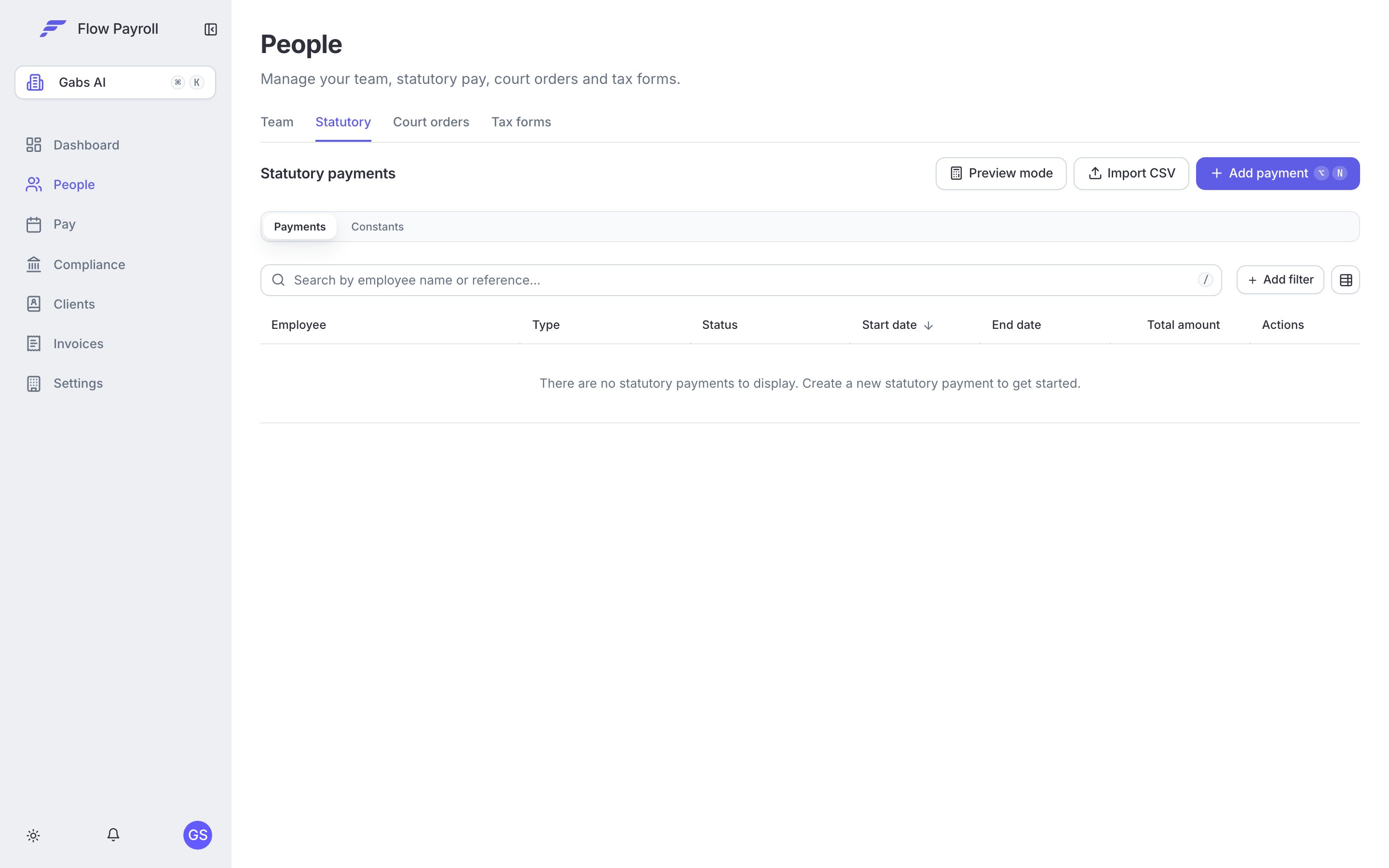
Statutory payments across your organisation
Supported payment types
How statutory pay flows through a pay run
When you record a statutory payment for an employee, Flow Payroll:- Calculates the Average Weekly Earnings (AWE) from the employee’s previous payslips.
- Determines eligibility based on the payment type rules (continuous employment, qualifying event dates, etc.).
- Generates a week-by-week breakdown of amounts for the full statutory period.
- Includes the statutory amounts in each pay run that overlaps with the statutory period — you do not need to add anything manually in the pay run itself.
- Reports the statutory pay through the FPS for each period it is paid.
Recording a statutory payment
You can record a statutory payment from the employee’s profile or from the organisation-wide statutory payments list.1
Open the Add statutory payment dialog
Go to the employee’s profile and open the Statutory payments section, then select Add statutory payment. Alternatively, go to People > Statutory payments and select Add.The dialog opens with a toggle to choose between New payment and Import from previous provider. Use the import mode when you are taking over payroll mid-way through an existing statutory period — you will need the AWE and weeks already paid from the previous provider.
2
Select the payment type
Choose the statutory payment type from the dropdown. Each option shows the acronym and a short description of what it covers.
3
Enter the core dates
- Start date — when the statutory period begins. For SSP this is the first day of sickness. For SMP, SPP, SAP, and ShPP this is when leave starts.
- End date — leave blank if the period has not yet ended; Flow Payroll will pay up to the statutory maximum.
- Qualifying event date — required for most types (see the table below). This is the date that determines eligibility and the start of the entitlement window.
4
Review average weekly earnings
Flow Payroll automatically calculates the AWE from the employee’s payslip history once you have set a start date. The calculated figure appears in the form. You can override it if needed — for example, when importing from a previous provider.
5
Preview the calculation
Select Preview to see the week-by-week breakdown before saving. The preview shows total payable, the rate band applied, and any warnings about eligibility. Resolve any warnings before confirming.
6
Confirm and create
Select Confirm & create. The payment is saved and will appear in pay runs from the start date onwards.You can attach supporting documents (MAT B1, fit notes, adoption matching certificates, etc.) — up to five files per payment.
If the employee’s employment start date or partner details are missing, Flow Payroll shows a validation error with a link to the relevant section of their profile. Complete those details first, then return to create the payment.
Eligibility rules
Flow Payroll enforces the statutory eligibility rules automatically. For most non-SSP payment types the key requirement is 26 weeks of continuous employment by the qualifying week (typically the 15th week before the expected week of childbirth). For SSP, the employee must have average weekly earnings at or above the Lower Earnings Limit at the time they fall sick. From April 2026, SSP is payable from day one of sickness with no Lower Earnings Limit check — Flow Payroll applies the correct rule based on the start date you enter. How much a day of SSP is worth depends on the employee’s qualifying days, which come from their working pattern. If the pattern is wrong, the daily rate is wrong — see working patterns. The Validation rules panel in the dialog summarises the applicable rules for the payment type and start date you have selected.Editing a statutory payment
Open the payment from the employee’s profile or the statutory payments list and select Edit. You can update the end date, qualifying event date, and AWE override. The payment type and employee cannot be changed — if either is wrong, discharge the existing payment and create a new one.Statutory pay preview mode (sandbox)
Go to People > Statutory payments and select Preview mode. This lets you model any statutory payment scenario without creating a real payment — useful for answering employee questions about what they will receive. Enter scenario parameters and select Calculate preview to see the breakdown.Statutory payments in pay runs
During a pay run, any active statutory payments for employees in the pay run are included automatically. You can see the statutory amounts in each employee’s payslip breakdown. No manual entry is required. If a statutory payment begins or ends mid-period, Flow Payroll pro-rates the amount to the days that fall within the pay period.Importing from a previous provider
If you are taking over an active statutory payment from another payroll provider, select Import from previous provider in the dialog. You will need:- The AWE calculated by the previous provider.
- The number of weeks already paid.
- The date paid up to (if applicable).
Importing statutory payments from CSV
To bring over many active statutory payments at once — typically when migrating an organisation from another provider — click Import CSV on the Statutory payments page. The importer runs on Flow Payroll’s shared import wizard: upload a CSV or Excel file, map the columns once, and save the mapping for next time. See importing data from CSV for how the wizard works.Mandatory columns
Optional columns
Some columns are required for specific payment types, noted below.
Template (
statutory_payment_import_template.csv — identical to the wizard’s Download template):
Where to go next
HMRC & RTI
Reclaim statutory pay through the EPS recoverable amounts section.
Running a pay run
See how statutory pay appears in pay run calculations.
Managing people
Ensure employee start dates and partner details are complete before recording statutory pay.
Leavers
Understand how statutory pay interacts with leaver processing.
Salary during statutory leave
Take back a salaried employee’s pay for the days statutory pay covers, and top it up if your policy does.